Welcome to this month’s WPBeginner Spotlight! May has been a big month for the WordPress ecosystem. The headline is the long-awaited release of WordPress 7.0 “Armstrong,” but it’s far from the only news.
This issue is also packed with a fresh wave of AI-powered tools designed to make managing your website easier than ever.
Whether you want to translate your entire site in minutes, talk to your analytics in plain English, or put your marketing on autopilot, there’s something here for you. Let’s dive in!

WPBeginner Spotlight is your monthly digest of essential WordPress news and community milestones.
Do you have an announcement? From product debuts to major updates or upcoming events, submit your details via our contact form for a chance to be featured in our upcoming issue!
Meet Universally, the New AI Tool That Translates Websites in Minutes 🌍
Most WordPress translation plugins slow down websites or require complex setups. There are SaaS platforms that solve the performance problem, but they are often too expensive and out of reach for most online businesses.
Meet Universally, a new AI-powered website translation platform that is faster and more affordable.
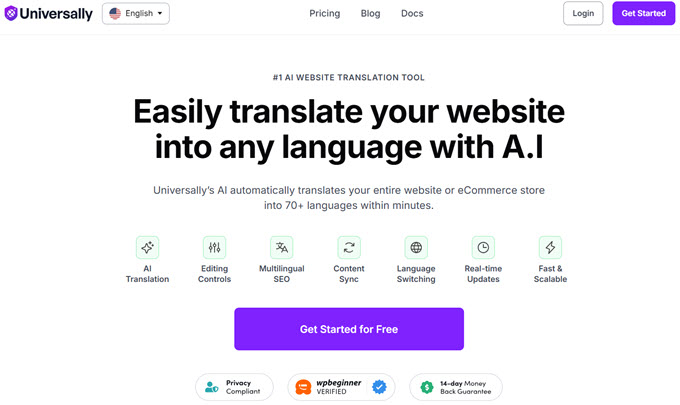
Unlike traditional WordPress translation plugins that store translated content inside the database, Universally uses a cloud-based system that keeps websites fast while automatically translating content into 110+ languages.
The platform is designed for WordPress users, WooCommerce stores, SaaS businesses, agencies, and online publishers who want to expand their global reach without managing complicated multilingual setups.
Some of Universally’s standout features include:
- AI-powered translation in minutes for blog posts, product pages, menus, forms, metadata, and more.
- Built-in multilingual SEO optimization with hreflang tags, translated metadata, multilingual XML sitemaps, and RTL language support.
- Cloud-based delivery that avoids database bloat and performance slowdowns common with traditional translation plugins.
- Automatic translation syncing whenever website content is updated.
- AI Glossary controls that protect brand names, product names, and technical terms from incorrect translations.
- Flexible language switchers and support for subdirectories, subdomains, or separate domains.
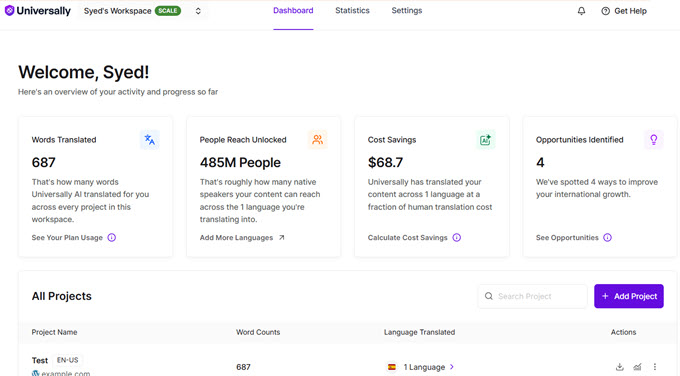
Universally also supports platforms beyond WordPress, including Shopify, Wix, Replit, and Lovable. The platform has already translated more than 250 million words during its private beta rollout.
A free plan is also available with support for one website, one language, and 2,000 translated words per month. Paid plans start at $7.50 per month when billed annually.
To learn more see the Universally announcement on WPBeginner, or get started with Universally here.
WordPress 7.0 “Armstrong” Revolutionizes the Dashboard
The WordPress core team has officially rolled out WordPress 7.0, dubbed “Armstrong,” and it marks a massive turning point for the platform.
We were following the development closely and were particularly excited about the native AI integrations and real-time collaboration features.
While real-time collaboration didn’t make it into this release, the AI integrations alone make it one of the most significant updates in recent years.
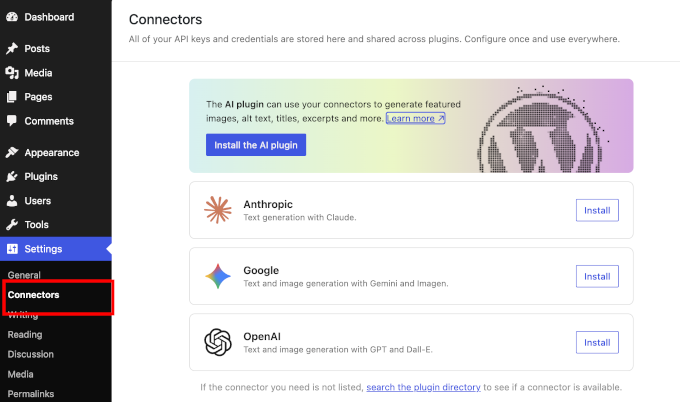
The native AI integrations help you add your AI API keys in one place. WordPress plugins can then use your API keys to power the AI features.
Another, more noticeable change is the design overhaul of the admin interface. It now features smoother transitions, instant page loads, and a new color scheme.
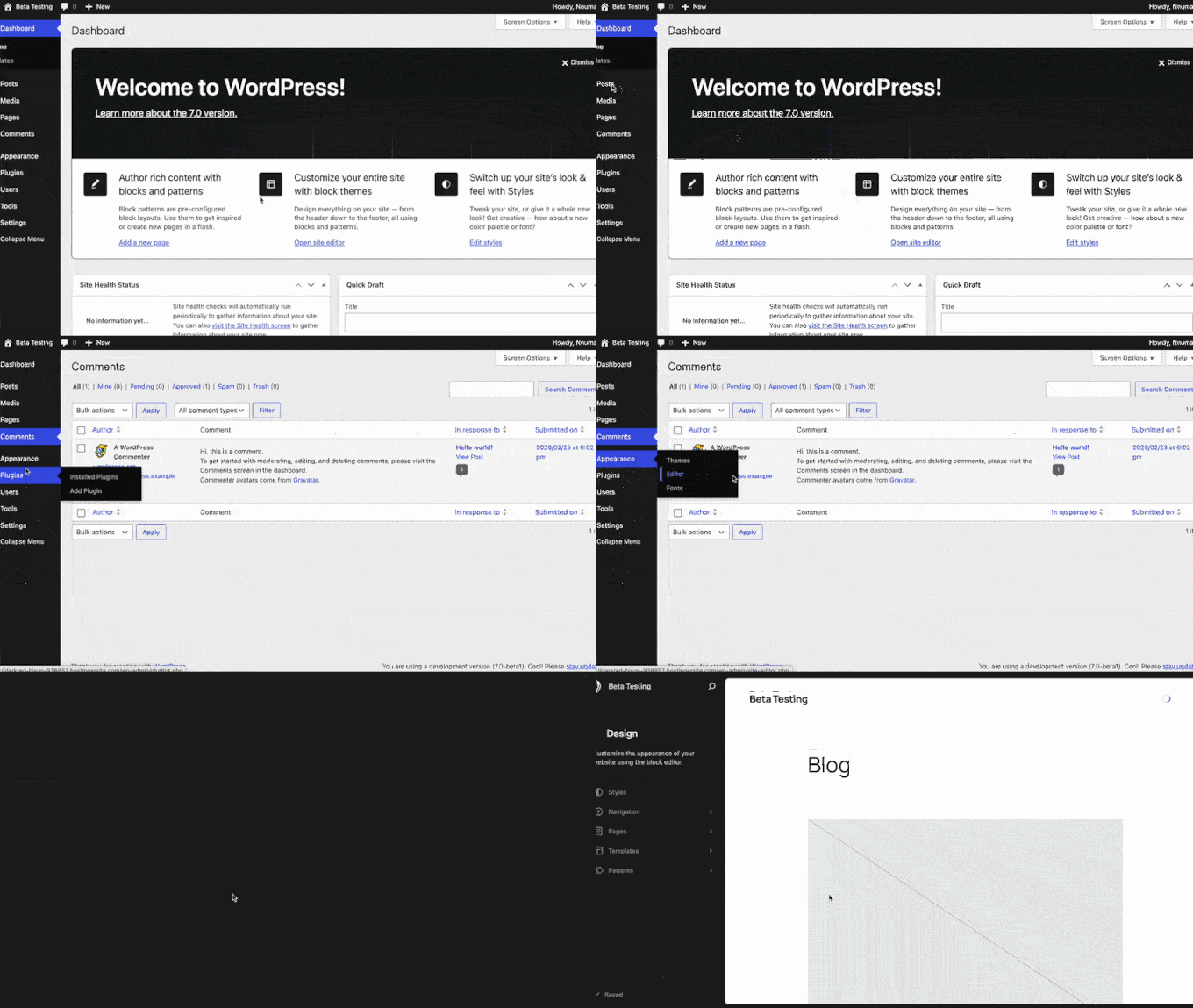
Beyond the visual overhaul, WordPress 7.0 introduces massive improvements to the block and site editing features, including custom CSS for individual blocks and controls to show or hide blocks on a per-device basis.
Be sure to check out our full breakdown to see all the new features in action and learn how to safely update your site.
Introducing ActiveLayer: AI-Powered, CAPTCHA-Free Spam Protection for WordPress 🛡️
ActiveLayer is a new AI-powered spam protection service designed to help WordPress users block spam comments and form submissions without using frustrating CAPTCHAs.
The tool was launched by WPBeginner founder Syed Balkhi after dealing with large-scale spam attacks across WPBeginner and other business websites. Read his full announcement here.
Unlike traditional anti-spam tools that rely heavily on CAPTCHAs, honeypots, or slow verification systems, ActiveLayer analyzes submissions server-side in milliseconds while keeping the experience friction-free for real users.
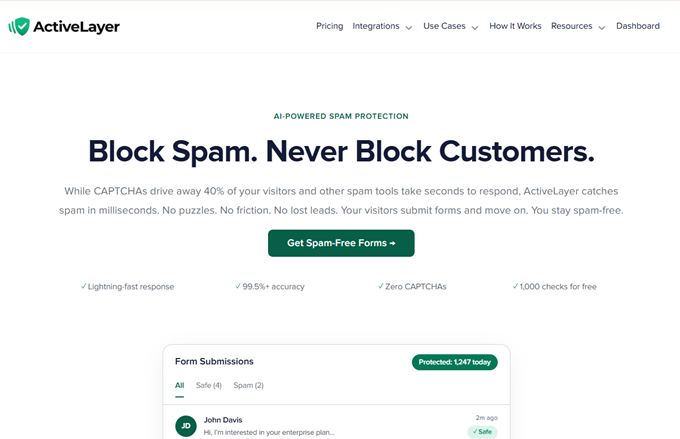
The platform works with WordPress comments and popular form plugins, including WPForms, Gravity Forms, Elementor Forms, and Contact Form 7. It also includes a REST API for developers using custom platforms and frameworks.
Some of ActiveLayer’s key features include:
- AI-powered spam detection in milliseconds without slowing down forms or user submissions.
- CAPTCHA-free protection that reduces friction and helps improve form conversions.
- Compatibility with popular WordPress form builders and native WordPress comments.
- Confidence scoring system that shows how certain the AI is about each spam decision.
- Centralized dashboard for managing spam protection across multiple websites.
- Unlimited website support on every plan with no per-site pricing restrictions.
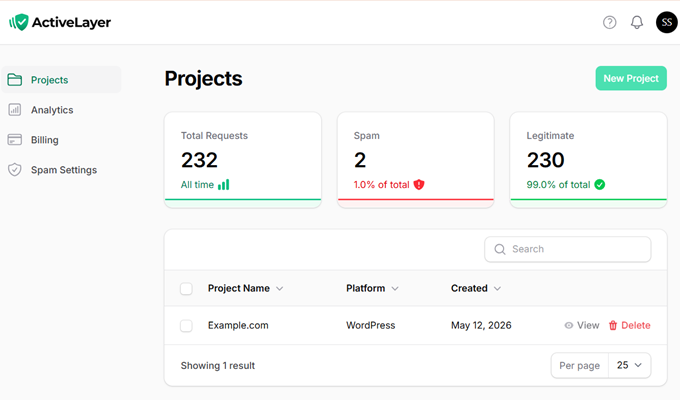
ActiveLayer also focuses heavily on speed and transparency. Instead of simply marking submissions as spam or safe, the platform provides a confidence score for every decision and allows users to submit feedback to improve future detections.
The plugin is free to install from WordPress.org and includes 1,000 free spam checks. Paid plans start at $4 per month when billed annually and include unlimited sites with full API access.
StellarWP Is No More: What This Means for GiveWP, LearnDash, SolidWP, and Other Popular Plugins ⚠️
Liquid Web has officially announced the end of the StellarWP brand, consolidating several well-known WordPress plugins and products under its new “Liquid Web Software” umbrella.
The move affects popular products including GiveWP, SolidWP, Restrict Content Pro, IconicWP, MemberDash, LearnDash, Kadence, and The Events Calendar.
According to the official announcement, Liquid Web is reorganizing its software portfolio around four core products: Kadence, LearnDash, The Events Calendar, and Give.
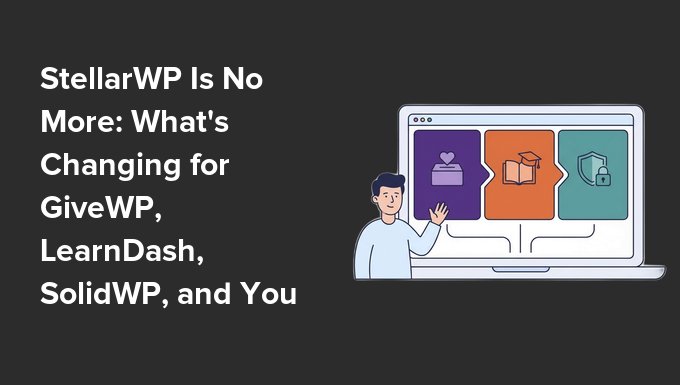
While Liquid Web says existing licenses, pricing, and functionality will continue for current customers, there is one important catch: legacy pricing is only protected as long as subscriptions remain active.
If a customer’s subscription lapses, then they will need to move to one of the newer Liquid Web Software plans at current pricing. We recommend checking that auto-renew is enabled if you plan to keep your existing setup.
The announcement has also raised concerns among long-time users about future roadmap priorities, pricing changes, and the long-term independence of previously standalone products.
For users considering alternatives, we recommend these independently managed plugins and tools across different categories:
- Charitable as an alternative to GiveWP for fundraising and donations.
- MemberPress instead of LearnDash, MemberDash, and Restrict Content Pro for courses and memberships.
- OptinMonster instead of Kadence Conversions for popups and lead generation.
- Duplicator as a backup and migration alternative to SolidWP.
- Sugar Calendar as a lightweight alternative to The Events Calendar.
- aThemes Sydney and Botiga as alternatives to Kadence themes.
For many WordPress users, the announcement serves as a reminder of the risks that can come with plugin consolidation and acquisitions, especially when pricing, support, and product direction change over time.
If your site depends heavily on any StellarWP product, now may be a good time to review your renewal settings, backup strategy, and long-term goals.
Uncanny Agent Brings Hands-Free AI Management to WordPress 🤖
Uncanny Agent is a new AI assistant built directly into WordPress that can answer questions about your website, complete admin tasks, and build automations using simple plain-English instructions.
The new feature comes from the team behind Uncanny Automator, one of the most popular WordPress automation plugins with more than 50,000 active websites.
Unlike general AI chatbots that only provide generic advice, Uncanny Agent connects directly to your WordPress website and plugins. This allows it to access real-time site data, WooCommerce orders, user activity, form submissions, and automation workflows.
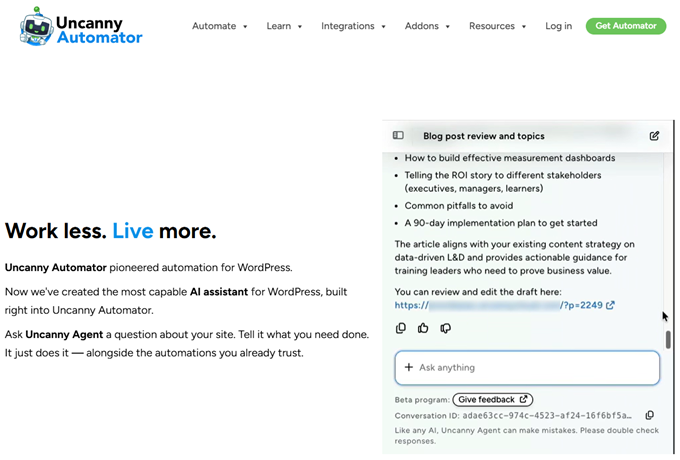
The goal is to help website owners reduce repetitive admin work and manage WordPress sites more efficiently using conversational AI directly inside the dashboard.
Some of Uncanny Agent’s standout features include:
- AI-powered WordPress management using natural language prompts directly inside the dashboard.
- Instant answers about site data, including WooCommerce sales, user activity, courses, and plugin workflows.
- Content and admin task automation for drafting posts, updating pages, formatting content, and generating reports.
- One-sentence automation building that creates workflows without manually configuring triggers and actions.
- Deep integration with popular tools like WooCommerce, Slack, Google Sheets, Mailchimp, Zoom, and OpenAI.
- Built directly into Uncanny Automator with no separate dashboard or third-party setup required.
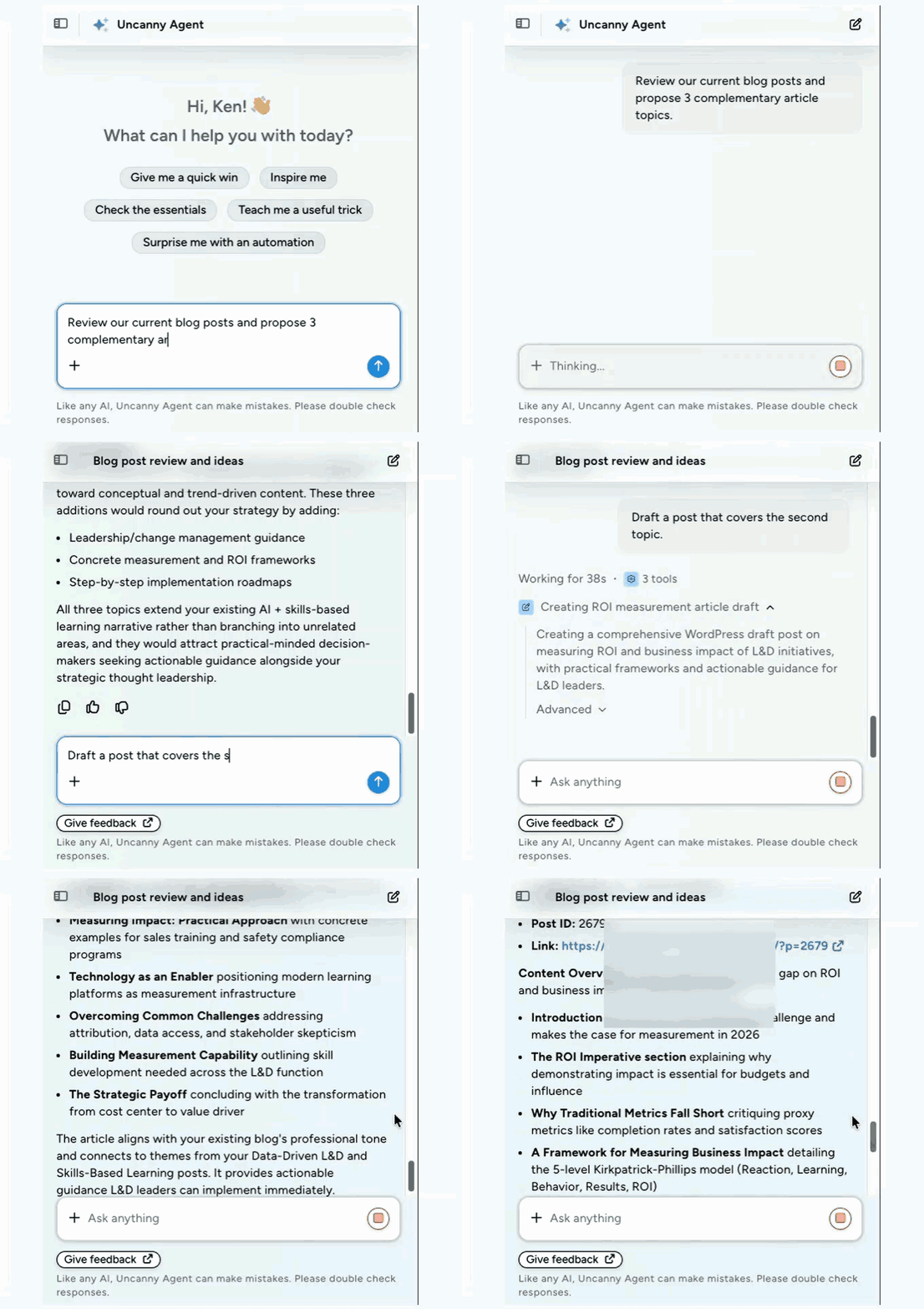
One of the most interesting features is the ability to create complex automations through conversation.
For example, users can simply ask Agent to send Slack notifications when a form is submitted or automatically add leads to Google Sheets and email lists.
Because the AI assistant works directly inside WordPress, it can interact with actual site data instead of relying on external APIs or generic documentation.
For more details, see our announcement post.
Note: Uncanny Agent is available through the Uncanny Automator AI + Automation Pro plan, which starts at $25 per month.
Talk to Your Data with MonsterInsights’ New Charlie Chat AI 📊
Analytics helps you make smarter decisions that drive business growth. However, for small businesses, the reports are often too complex to be useful.
MonsterInsights, the best Google Analytics plugin for WordPress, already makes analytics easier for WordPress users with beginner-friendly reports, quick shortcuts, and easy setup.
To take it one step further, MonsterInsights has launched Charlie Chat, a new AI-powered analytics assistant that helps WordPress users understand their Google Analytics data through simple conversational questions.
Charlie Chat is built directly into the WordPress dashboard and connects to a website’s real GA4 data to deliver instant answers, recommendations, and actionable insights.
Instead of manually digging through reports and charts, you can now ask questions like “What are my top traffic sources?”, “How are my sales performing?”, or “Which content should I update next?” and receive plain-English responses.
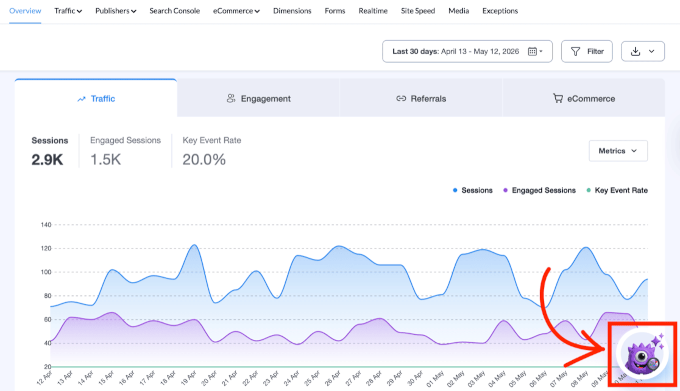
Some of Charlie Chat’s standout features include:
- Conversational AI analytics that answers plain-English questions using real GA4 data.
- Actionable recommendations that explain what the numbers mean and what to do next.
- Support for SEO, traffic, eCommerce, and content insights directly inside WordPress.
- Quick Key Insights shortcuts that instantly open relevant reports and dashboards.
- Pinned conversations and history tracking for saving important analytics discussions.
- Available to all MonsterInsights users, including the free Lite version.
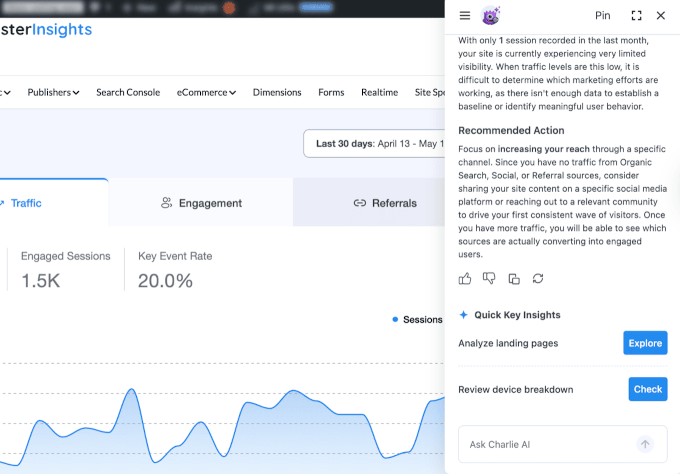
One of the biggest advantages of Charlie Chat is its focus on recommendations instead of raw reporting. Every response includes a suggested next step based on the site’s actual analytics performance.
For WooCommerce stores, Charlie can also answer questions about revenue trends, cart abandonment, and sales performance when the eCommerce addon is enabled.
WPForms Launches Native Klaviyo Addon to Boost Email ROI
Klaviyo is a powerful AI-powered email and SMS marketing platform. But a lot of WordPress users struggle to connect it to their forms without relying on expensive third-party tools like Zapier or messy CSV exports.
To fix that, WPForms, the popular WordPress form builder, has launched its native Klaviyo Addon. Now data flows from your WordPress forms directly into your Klaviyo account in real time, with no middleman subscriptions or hidden fees.
Here’s what the new addon brings:
- Instant Profile Sync: Automatically create or update Klaviyo profiles, and add custom attributes right inside the form builder.
- Smart Conditional Logic: Route contacts to different Klaviyo lists or segments based on how they answer specific form questions.
- Automated Consent Handling: Respects Klaviyo’s single and double opt-in rules automatically, so your lists stay compliant without any extra work.
- Multi-Action Flexibility: Use a single form to add subscribers, update profiles, or remove users from lists, all based on your own rules.
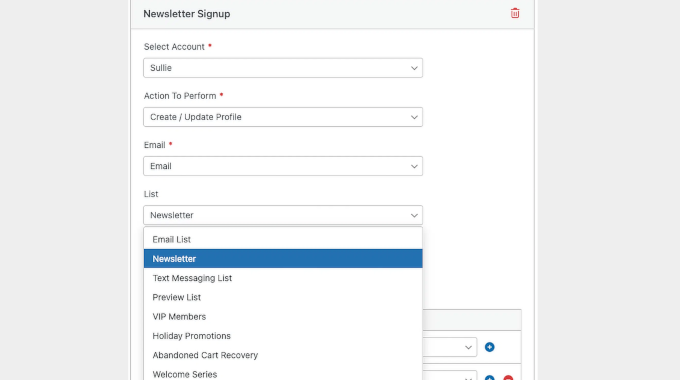
The Klaviyo Addon is available now for all WPForms Plus, Pro, and Elite users. Simply grab your private API key from Klaviyo, add it to your WPForms settings, and activate the connection on any form to start syncing leads instantly.
SeedProd Integrates With WordPress Abilities API for Programmable Actions
SeedProd, the popular WordPress site builder platform, has introduced support for the new WordPress Abilities API. This makes its website builder programmable through AI tools, automation platforms, and REST API clients.
The update lets developers and site owners control key SeedProd features using plain-English AI commands or simple API requests.
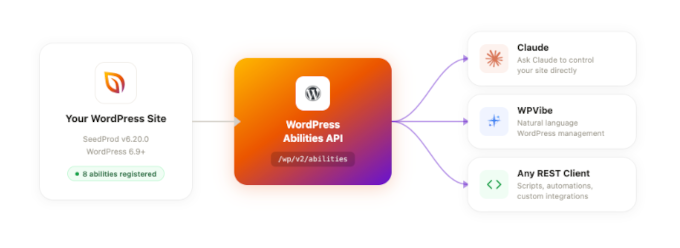
Instead of manually opening the WordPress dashboard, users can now automate common tasks like toggling Coming Soon mode, importing themes, checking site status, or updating landing pages.
SeedProd ships with eight built-in programmable actions in this first release:
- Check your site’s current status, including coming soon mode, maintenance mode, theme builder, and license info.
- Turn Coming Soon mode on or off.
- Turn Maintenance Mode on or off.
- List all your SeedProd pages and their IDs.
- Create or update a SeedProd page.
- Turn the SeedProd theme builder on or off.
- Import a SeedProd theme from a ZIP URL.
- Activate a Pro license key.
SeedProd also highlighted its integration with WPVibe, which is a free plugin that connects WordPress websites with AI tools.
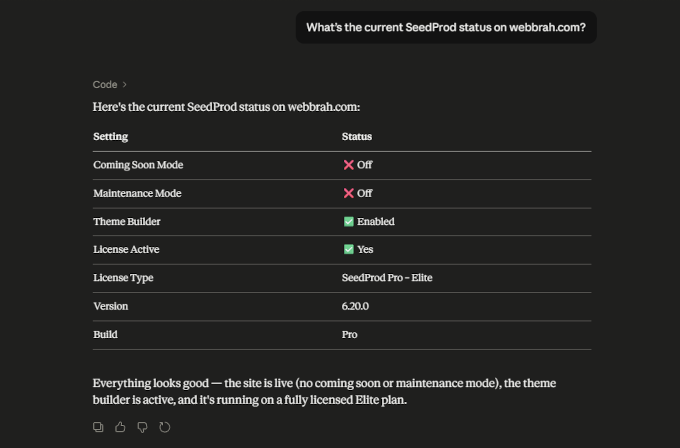
Related: See our full review of WPVibe to learn more.
The feature is available on all SeedProd plans, with some actions depending on Pro features like Theme Builder access.
Related: SeedProd isn’t the only one. PushEngage, the popular web push notification plugin, is also one of the first plugins to support the new WordPress Abilities API. Its latest release (4.2.3) registers 23 abilities, so you can send push notifications, build segments, and pull analytics just by chatting with an AI assistant connected to your site. Check out the announcement here.
Meet HelpJet, Free AI Powered Live Chat Support That Learns Your Business in Minutes
HelpJet is a new AI-powered customer support chatbot designed to help businesses automate customer conversations using their existing website content.
Created by the team behind Heroic Knowledge Base, HelpJet can learn from WordPress websites, knowledge bases, documentation, and support content in just a few minutes.
The chatbot then uses that information to answer customer questions through a live chat widget embedded directly on your website.
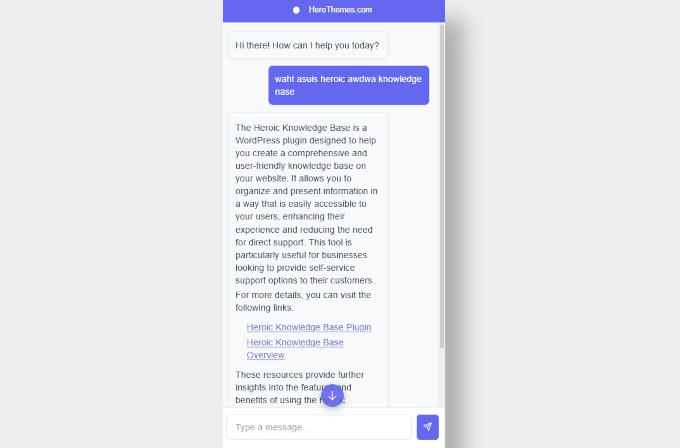
Unlike traditional scripted chatbots, HelpJet uses AI to understand customer intent and respond conversationally. The platform is designed to reduce repetitive support tickets while still allowing easy handoff to human support teams when needed.
Here are the key features:
- AI-powered conversations trained on your existing website content
- Works with WordPress, WooCommerce, Shopify, Wix, Squarespace, and more
- Automatic weekly content syncing to keep answers updated
- Human support escalation when the AI cannot resolve an issue
- Conversation analytics, activity logs, and satisfaction tracking
- Built-in preview and training environment before going live
- Simple embed setup with no coding required
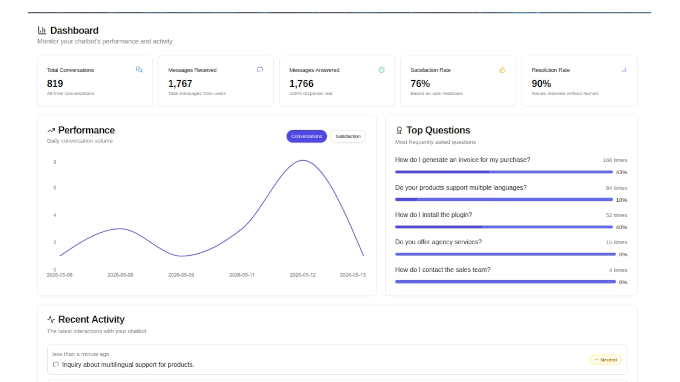
HelpJet also includes a dashboard where businesses can track total conversations, top customer questions, resolution rates, and customer satisfaction scores. The platform logs conversations and labels them by sentiment to help teams identify common issues faster.
HelpJet is free to start and includes one AI bot with up to 100 conversations per month. Paid plans add more bots, higher conversation limits, white-labeling options, and advanced customization features.
The platform works on any website that supports JavaScript embeds, while WordPress users can also install a dedicated plugin for easier setup.
MemberPress Introduces ClubConnect: Native Direct Messaging for Membership Sites
For membership site owners, keeping community engagement high usually means outsourcing chat to third-party platforms like Slack or Discord.
To bridge this gap, MemberPress has launched ClubConnect™, a native add-on that brings real-time group chat and private messaging directly onto your membership website.
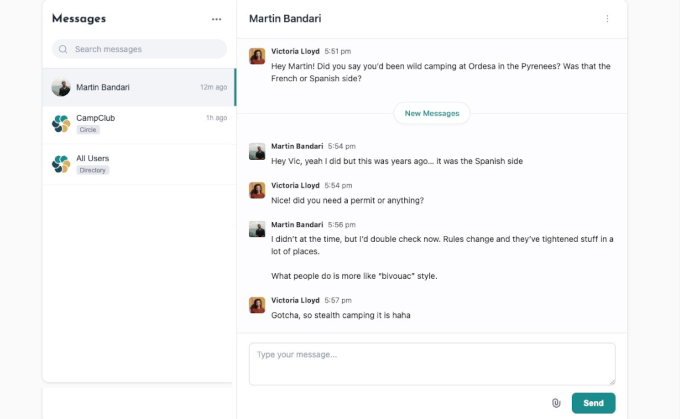
As part of the ClubSuite™ family, ClubConnect creates a unified inbox at /connect/ where members can interact spontaneously without leaving your platform.
This lowers the friction of community interaction by introducing a faster, conversational layer alongside traditional long-form forum posts.
Here’s how the new add-on works with existing MemberPress features:
- Seamless CoachKit Messaging: Upgrades your coaching workflows by giving mentors, clients, and student cohorts an active line of communication. Clients can message their coach directly, submit workout or study PDFs via built-in drag-and-drop file sharing, and receive real-time guidance.
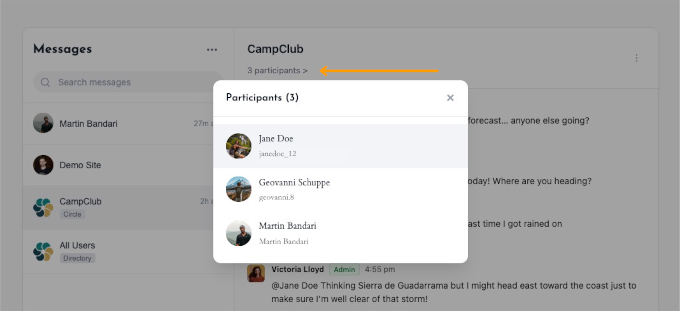
- Instant ClubCircles Chat Rooms: Complements your private community forums. While ClubCircles handles threaded discussions, ClubConnect automatically spawns a real-time side-chat room for every active Circle. If you ban or add a member in a Circle, the participant list syncs automatically.
- Directory-Driven Sidebars: Integrates directly with ClubDirectory. Members can search the directory for peers, click into a profile, and immediately launch a one-on-one private message thread, turning a static list of names into a collaborative network.
And here are the key benefits for WordPress users:
- Higher Retention & Engagement: Bringing conversations “home” means members stay on your site longer and keep coming back, instead of drifting off to Slack or Discord.
- New Ways to Earn: The messaging hub gives you something extra to offer in your higher-priced plans, like direct coach access or VIP networking rooms.
- Modern Messaging Experience: Supports the features members expect, including @mentions, emoji reactions, universal search filtering, and automated email alerts for unread messages.
- Strict Admin Privacy: Site owners can completely toggle off direct messaging to keep conversations strictly group-focused, while users retain the option to opt-out of specific directory channels.
ClubConnect is available now for all users on the MemberPress Scale plan. Simply install the add-on from your dashboard, navigate to ClubSuite™ » Settings » Connect and choose the auto-create page option to deploy your community’s new messaging hub in minutes.
If you have older Circles or Directories, a single click of the ‘Sync Rooms’ button activates chat for them retroactively.
Boost Compliance Fast: WPConsent Rolls Out Smarter Consent Records, Google Consent Mode V2, and Cookie Inspector
Managing data compliance on WordPress has historically felt like a guessing game. But WPConsent has been making compliance easier for WordPress site owners.
Across its latest releases (1.1.5 and 1.1.6), WPConsent has rolled out a redesigned dashboard, a deeper script scanner, pre-styled cookie policy pages, and full alignment with Google’s latest tracking standards.
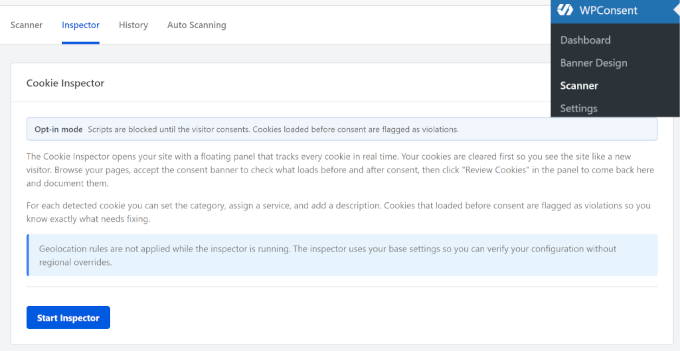
It helps you spot compliance gaps while making sure your legal pages look professional right out of the box, all without writing custom code or CSS.
Here are the main features:
- The Guided Cookie Inspector: Head to WPConsent » Scanner to see your site exactly like a first-time visitor would. The scanner traces every cookie back to the exact script that set it, so you can click any tracker and block it in seconds.
- Site Consent Health Score: The redesigned dashboard now centers on a single score that tells you how compliant your site is at a glance. It checks your banner setup, location-based rules, and scanning schedule, then suggests fixes so you never have to dig through settings to find what’s missing.
- Google Consent Mode V2 Support: WPConsent now sends Google all the consent signals it needs, including a new one for personalization. This means your ads and analytics stay accurate even when visitors decline tracking.
- Banner Snapshot Logs: For Pro users, every consent record now saves a snapshot of exactly what the visitor saw, including the banner text, buttons, language, and categories. That way your records always match what was actually on screen.
WPConsent also enhanced the user experience with features to simplify compliance for small business owners.
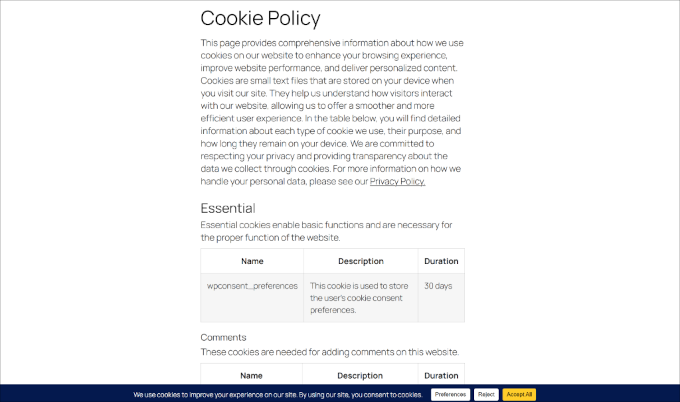
These include:
- Pre-Styled Cookie Policies: The cookie policy pages have been redesigned with clean layouts, tables, and spacing out of the box. They’re built to inherit your theme’s fonts and colors automatically, so they blend right in without any CSS tweaks.
- Seamless Multilanguage Support: WPConsent now follows the language you’ve set in WPML, Polylang, or TranslatePress. So, there’s no need to switch languages inside the plugin separately.
- In-Admin Docs Overlay: A new “Help” button opens a searchable documentation panel right inside your dashboard. So, you don’t have to open a new tab while configuring tricky privacy settings.
These compliance features are officially live for all users. Simply update WPConsent to version 1.1.6 via your WordPress plugins page, and the styled policy pages and dashboard scores will be ready as soon as you activate it.
Charitable Adds Abandoned Donation Recovery, Zapier Integration, and New Braintree & Razorpay Support
To make online giving simpler for nonprofits and their supporters, the popular WordPress fundraising plugin Charitable has rolled out a series of major feature updates.
These new tools are designed to stop your donations from slipping through the cracks and expand how you receive gifts globally.
Here is a breakdown of what’s new:
Connect Your Campaigns to 7,000+ Apps via Zapier
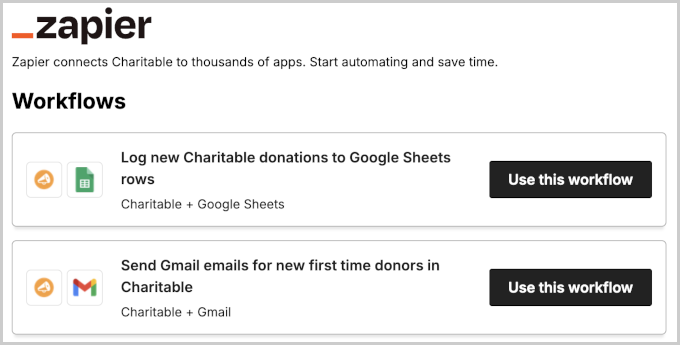
If you find yourself manually copying donor data over to spreadsheets or typing out welcome emails by hand, you can now put those tasks on autopilot. Charitable has launched a native Zapier integration that connects your website to over 7,000 everyday apps.
Win Back Interrupted Supporters with Donation Recovery
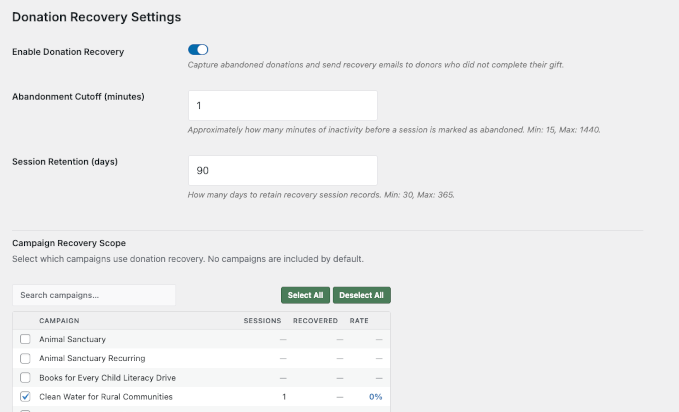
Studies show that over half of the people who start filling out an online donation form get distracted and leave before finishing. Charitable Pro’s new Donation Recovery feature fixes this by automatically detecting when a form is abandoned.
Smart, Accurate Ad Tracking for Social Media
If you run paid ads on Meta (Facebook/Instagram) or TikTok to find new donors, you know how hard it is to match up your ad costs with actual donations. The new Conversion Tracking tool gives ad networks the clear data they need to optimize your budget.
More Ways to Accept Local and International Donations
Charitable has been adding support for more payment platforms, making it easier to accept donations through the options best suited to your organization.
Here are the main updates:
- Organizations in India can now use RazorPay.
- European organizations can use familiar local options and a Braintree integration.
- Support for PayPal Commerce, Venmo, and GPay.
These features are available across the Charitable Pro and Elite plans. Simply update the main plugin and its respective addons from your WordPress updates panel to access the new automation settings, payment gateways, and tracking dashboards.
In Other News
- Easy Digital Downloads has introduced secure Magic Login Links to eliminate password friction for returning customers at checkout. This update helps reduce cart abandonment by allowing users to log in with a single click, and introduces a new Profile Editor Block for a more seamless shopping experience.
- Bring Google Photos to Your WordPress Site with Envira Gallery’s powerful new Google Photos addon. It directly connects your Envira Gallery to your Google Photos account, allowing you to seamlessly import your favorite snapshots and display them in beautiful, responsive WordPress galleries.

AIOSEO is the most comprehensive WordPress SEO plugin geared toward the future of SEO in the AI search era. It includes features like llms.txt, AI-friendly versions of your content, advanced redirects, and AI-powered writing tools built in.
- WordPress.com launched a creative new blog-posts-to-podcast feature, which allows users to convert any written blog post into an AI-generated, two-host audio podcast. This exciting tool gives creators a brand-new way to repurpose content and engage listeners across different mediums.
- AdTribes has launched a Feed Translation Addon that bridges the gap between multilingual WooCommerce storefronts and global marketing channels. Store owners can now sync translated product data directly with their feeds to make sure international customers get a consistent shopping experience in their native language.
- WordCamp US, one of the flagship WordCamp events of the year, will take place in Phoenix, Arizona from August 16–19, 2026. Limited tickets are still available.

Accept Stripe Payments in WordPress Without a Cart
WP Simple Pay is the best WordPress Stripe payments plugin designed to help you accept credit cards, Apple Pay, Google Pay, and ACH bank transfers in minutes. Start selling products, accepting donations, or setting up recurring subscription payments easily without a shopping cart or eCommerce plugin.
- FunnelKit 3.8.1 delivers a deep, native integration with MasterStudy LMS. It allows course creators to trigger high-converting automations based on quiz attempts, lesson completions, and enrollment status.
- WooCommerce announced a major expansion to its Point of Sale (POS) and in-person payments capabilities. This update aims to provide a more unified commerce experience, bridging the gap between physical retail stores and online WooCommerce shops for omnichannel merchants.
New Tools & Plugins
- Universally: A powerful new AI tool that translates your entire website in minutes, providing highly accurate, automated multilingual support.
- ActiveLayer: An innovative, AI-powered spam protection plugin that silently blocks bots and malicious submissions without forcing users to solve frustrating CAPTCHAs.
- Uncanny Agent: A futuristic AI assistant for WordPress that automates tedious site management tasks based entirely on simple text prompts.
- HelpJet AI: A free, AI-driven live chat support tool that trains itself on your site’s content to provide instant, 24/7 customer service.
That’s all for this month’s WPBeginner Spotlight! We hope you found these updates, tools, and insights helpful for growing your WordPress website. If you have any feedback or want to see a specific topic covered in a future issue, let us know!
If you liked this article, then please subscribe to our YouTube Channel for WordPress video tutorials. You can also find us on Twitter and Facebook.
The post WPBeginner Spotlight 24: From WordPress 7.0 to Hands-Free AI Management – What’s New in the Ecosystem first appeared on WPBeginner.